A keyboard-first TUI for OpenStack

Horizon is slow.
The CLI is verbose.
lazystack is fast.

Manage OpenStack like you manage Kubernetes with k9s. Single binary. No runtime deps. Reads your clouds.yaml.

latest release · Apache 2.0 · built in Go
Horizon / CLI
lazystack
Browser + three tabs deep
One terminal
openstack server list --long
j / k
Click confirm, then wait
Confirm, already done
No bulk actions
Space to select, one key to act
Manual refresh
Auto-refresh, everywhere
Log in per cloud
Switch clouds in a keystroke
See it

Your whole cloud, one terminal.

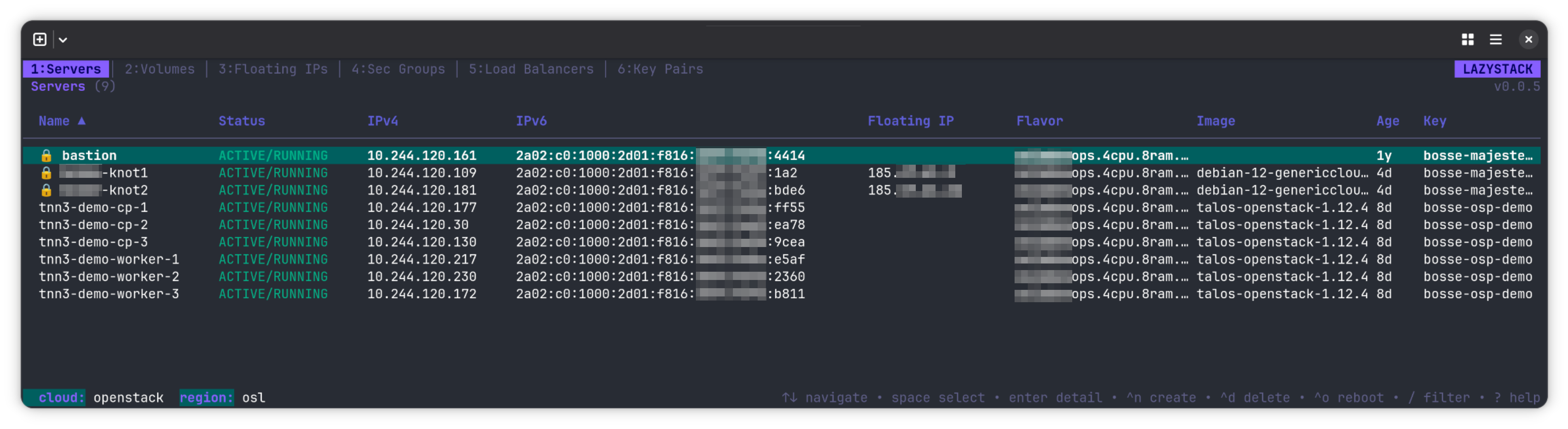
Dynamic tabs adapt to your cloud's service catalog. Auto-refresh runs in the background. Bulk-select with space, then act on the whole selection at once.

~ lazystack --cloud osl
Lazystack terminal UI showing a list of servers
What's inside

Nine tabs. Every OpenStack resource you actually touch.

Dynamic tabs — they appear only when the service is there. No Cinder, no Volumes tab. No Octavia, no Load Balancers tab. Everything else works the same way across every view.

01 / SERVERS

Full VM lifecycle

List, create, delete, rebuild, resize, rescue, snapshot, clone. Bulk operations across selected servers.

02 / VOLUMES

Cinder, without the ceremony

Create, attach, detach. Server picker with type-to-filter. Cross-navigate to the attached instance.

03 / FLOATING IPS

Allocate and associate

Allocate, associate, disassociate, release. Auto-allocates from the first external network when none are free.

04 / SECURITY GROUPS

Expandable rules

Groups expand in place to show rules. Create, delete, edit inline without leaving the tab.

05 / NETWORKS

Networks, subnets, ports

All in one combined view. IPv6-aware with address-mode and RA-mode configuration.

06 / ROUTERS

Interfaces in a keystroke

Create and delete routers. Add or remove interfaces via subnet picker with optional custom IP.

07 / KEY PAIRS

Generate or import

RSA and ED25519 generated locally, or import from ~/.ssh/. Save the private key with 0600.

08 / IMAGES

Upload, download, edit

File picker, format auto-detection, progress bars. Delete, deactivate, or re-enable.

09 / LOAD BALANCERS

Octavia, as a tree

Load balancer to listener to pool to member. Full CRUD, cascade delete, bulk member ops.

PRESS Q

Quota overlay

Compute, network, storage — all three on one screen. Color-coded bars for what's under, near, or over limit.

PRESS P

Project switcher

Re-scopes Keystone auth to a new project without restarting. Tabs reset cleanly, auth persists.

PRESS C

Cloud switcher

Flip between every cloud in your clouds.yaml. Dynamic tabs re-evaluate against the new service catalog.
Install

One binary. Any distro.

Single Go binary, statically linked. No runtime deps — just the compiled binary and your clouds.yaml.

Homebrew

macOS · Linux
$brew install larkly/tap/lazystack

Arch (AUR)

Linux
$yay -S lazystack

Debian · Ubuntu

.deb
$sudo dpkg -i lazystack_*.deb

Fedora · RHEL

.rpm
$sudo rpm -i lazystack-*.rpm

go install

any
$go install github.com/larkly/lazystack/cmd/lazystack@latest

Pre-built binary

linux · darwin · arm64
$curl -L github.com/larkly/lazystack/releases/latest
Requirements OpenStack with Keystone v3 and Nova v2.1+ · a valid clouds.yaml · Go 1.26+ to build from source
All releases →
The keybinding system

One pattern. Learn it once.

We won't list every shortcut here — they evolve. The system doesn't. Once you know the shape, the rest is muscle memory.

j/space

Safe = single letter

Navigate, filter, sort, scroll, select. If it can't break anything, it takes one keystroke.

^d^o^f

Dangerous = Ctrl-prefixed

Delete, reboot, rebuild, resize. Always paired with a confirmation modal. Fat-fingers stay harmless.

123

Tabs = numeric

Numbers jump straight to a resource. Arrows cycle. Same behaviour in every view.

?

Press ? inside lazystack.

Every current keybinding, grouped by context, always up-to-date. That's the source of truth — this page isn't trying to be one.

Stop clicking. Start typing.

Install once, then never reach for Horizon again.